
Showroom-ready photos for your inventory
Swap messy lot backgrounds for a clean studio backdrop in seconds. Built for dealerships that want consistent, professional listings — your vehicle, new backdrop.
Your vehicle pixels are preserved — only the background is replaced.
- Dealership brands running LotStudio AI
- 4Dealership brands running LotStudio AI
- Of vehicle pixels preserved per export audit
- 100%Of vehicle pixels preserved per export audit
- Per image on most batches
- SecondsPer image on most batches
- Ships with per-image audit metadata
- Every exportShips with per-image audit metadata
Before and after, side by side
The vehicle is the same on both sides of the handle. Only the background is replaced — every badge, wheel, and plate is exactly as photographed.
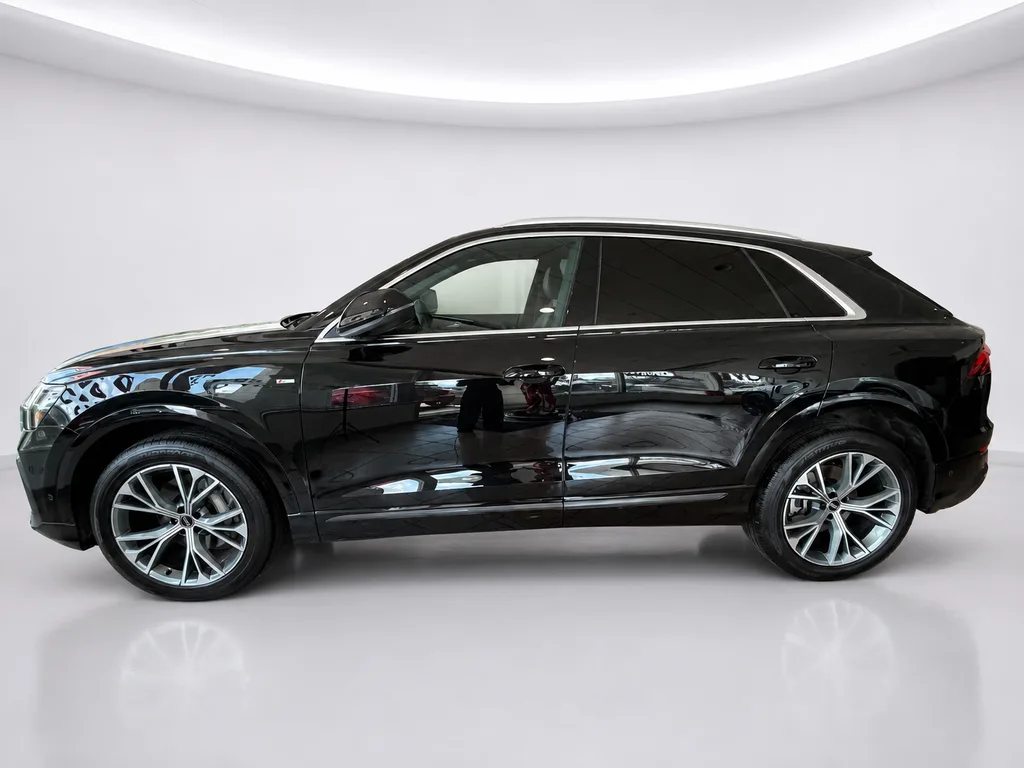
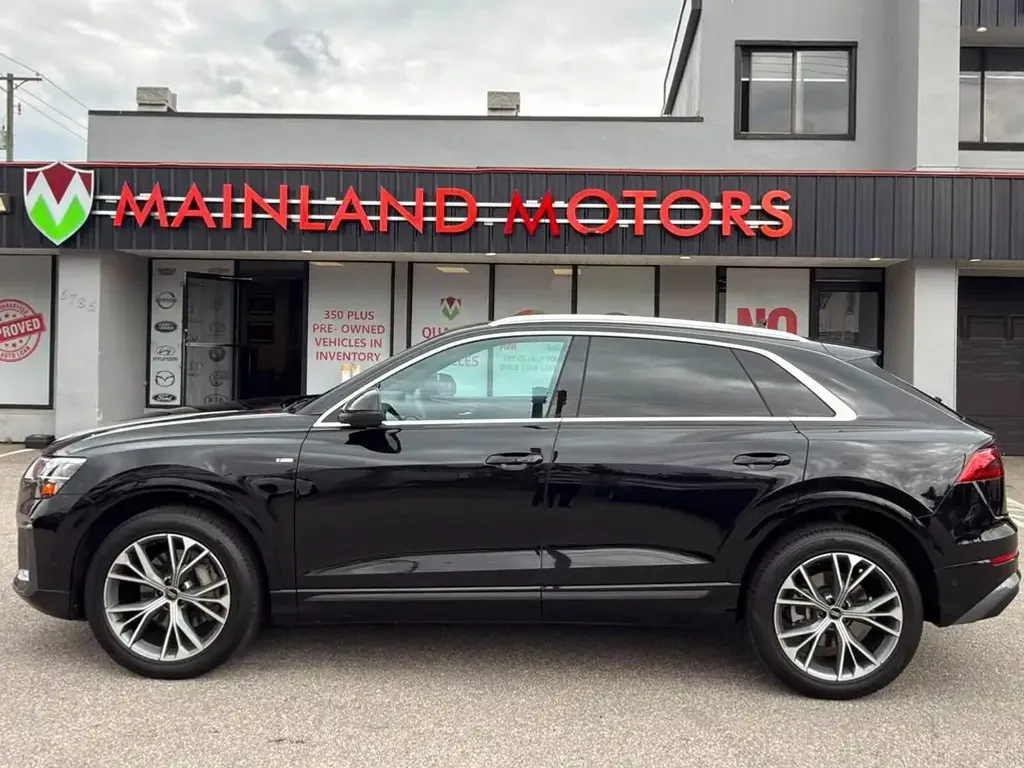
Audi Q8 — dealership forecourt replaced with Studio White.
Drag to compare
Pick the backdrop per batch
Every preset is applied behind and around the vehicle. The car itself is the one you photographed.
- Studio White
- A clean white sweep with a soft contact shadow.
- Studio Gray
- Neutral grey seamless for darker inventory.
- Showroom
- Polished floor and diffused overhead light.
- Outdoor Lot
- An even, uncluttered forecourt setting.
- Luxury Showroom
- Photoreal scene for premium listings.
- Marble Luxury
- Photoreal scene with a stone floor finish.
Built for dealership inventory pipelines
Background replacement only. Nothing about the vehicle changes.
Bulk background replacement
Drop dozens of inventory shots and get studio backgrounds back, ready for your VDPs.
Vehicle pixels preserved
Per-image audit confirms the vehicle is byte-identical to the source — only the backdrop changes.
ZIP export with audit
Approve the shots you want and download a single ZIP including per-image audit metadata.
Dealership-friendly workflow
Approvals, filters, and presets built around how a sales lot actually moves inventory.
What stays untouched
The background is the only thing that changes. Every export carries the audit that proves it.
- Badges, emblems, and model names
- Wheels, tires, and ride height
- Paint, body panels, and trim
- License plates and dealer stickers
- Headlights, taillights, and mirrors
- The stance and framing you shot
How it works
From parking lot to product page in four steps.
- 01Upload
Drag in your lot photos — JPG or PNG.
- 02Pick background
Choose a studio backdrop preset per batch.
- 03Review
Approve or reject results in a fast grid.
- 04Export
Download a ZIP with audit metadata included.
We run our own inventory through it
LotStudio AI was built for our dealerships before it was built for anyone else’s. Every car across all three brands goes through the same pipeline you would be using.
Two rooftops, one look. Before this, our Surrey and Abbotsford listings never matched — different lots, different light, different weather. Now every car lands on the same backdrop no matter which store shot it.
Our cars are the product, so the lot behind them was never doing us any favours. We shoot where the car is parked and the backdrop gets handled after — and the plate frame comes back clean without anyone touching the car.
We upload the whole batch, run through the grid, approve what works, and pull one ZIP. The part that sold us is that nothing about the car changes — same wheels, same badges, same plate.
Ready to upgrade your listing photos?
Start replacing backgrounds in your inventory shots today. Your vehicle, new backdrop.